Hey there! As a supplier of drain cameras, I often get asked about how to adjust the brightness of the drain camera lights. It's a crucial aspect, especially when you're trying to get a clear view of what's going on inside those pipes. In this blog, I'll share some tips and tricks on how to do just that.
First off, let's understand why adjusting the brightness of the drain camera lights is so important. When you're using a drain camera, you're usually dealing with dark and confined spaces. The camera needs proper lighting to capture clear images and videos of the drain's interior. If the lights are too dim, you might miss important details like cracks, blockages, or other issues. On the other hand, if the lights are too bright, it can cause glare, which also makes it difficult to see clearly.
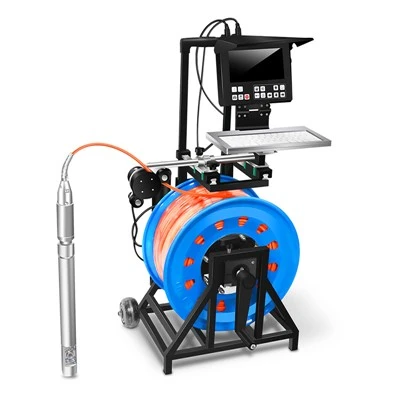
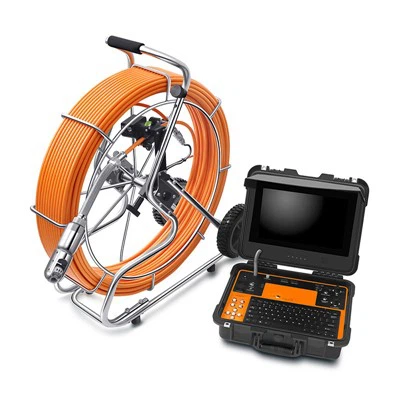
Now, different drain cameras come with different ways to adjust the light brightness. Some of the more basic models might have a simple on - off switch for the lights, but not much in terms of brightness adjustment. However, most of the modern and high - end drain cameras, like our 30m Drain Inspection System, offer multiple levels of brightness control.
One of the most common ways to adjust the light brightness is through the control panel of the drain camera system. Usually, there will be a dedicated button or a slider for brightness adjustment. If it's a button, you can press it repeatedly to cycle through different brightness levels. For example, a single press might increase the brightness a little bit, and a long - press could take you to the maximum brightness setting. If it's a slider, you can move it left or right to decrease or increase the brightness respectively.
Another thing to consider is the type of environment you're working in. If you're inspecting a small, narrow drain, you might not need as much light as you would for a large sewer pipe. In a small drain, too much light can create a lot of reflections and make it hard to get a clear view. So, start with a lower brightness setting and gradually increase it until you get the best image quality.
For larger pipes or areas with a lot of debris, you'll probably need more light. In these cases, you can set the brightness to a higher level. But be careful not to overdo it, as too much light can still cause problems. You might end up with a washed - out image where you can't distinguish between different objects in the drain.
Some drain cameras also allow you to adjust the brightness based on the camera's zoom level. When you zoom in on an object in the drain, the amount of light needed might change. You can adjust the brightness accordingly to keep the image clear.
If you're using our CCTV Drain Inspection Cameras or CCTV Drain Camera, they are designed with user - friendly brightness adjustment features. The intuitive control interface makes it easy for both professionals and DIY enthusiasts to get the right lighting for their inspections.
It's also a good idea to do some test runs before starting a full - scale inspection. Set up the camera in the drain and play around with the brightness settings to see what works best. This way, you can avoid wasting time during the actual inspection trying to get the lighting right.
In addition to adjusting the brightness on the camera itself, you can also use external lighting sources in some cases. For example, if you're working near an access point of the drain, you can use a flashlight to provide some additional light. However, this should be used carefully, as it can also cause uneven lighting and reflections.
Now, let's talk about some common problems you might encounter when adjusting the brightness. One issue is that the brightness might not seem to change even when you're trying to adjust it. This could be due to a few reasons. First, check if the camera's battery is fully charged. A low battery can sometimes affect the performance of the lights. Also, make sure there are no loose connections between the camera and the control unit.
Another problem could be that the brightness levels are not sufficient. If you find that even at the maximum brightness setting, the image is still too dark, it could be a sign that the camera's lights are not powerful enough for the job. In this case, you might want to consider upgrading to a more powerful drain camera system.
We understand that getting the right brightness for your drain camera is essential for accurate inspections. That's why we offer a wide range of drain cameras with different lighting capabilities to suit your needs. Whether you're a professional plumber, a maintenance worker, or someone who just wants to check their home drains, we have the right solution for you.
If you're interested in our products or have any questions about drain camera light brightness adjustment, feel free to reach out to us. We're always here to help you make the most of your drain inspection experience. You can get in touch with us to discuss your requirements and we'll work with you to find the perfect drain camera for your needs.
In conclusion, adjusting the brightness of the drain camera lights is an important skill that can greatly improve the quality of your drain inspections. By understanding how to use the brightness controls on your camera, considering the environment, and being aware of common problems, you can ensure that you get clear and accurate images every time. So, go ahead and give it a try with your drain camera, and if you need any more help, don't hesitate to contact us.
References


- Industry knowledge and experience as a drain camera supplier.
- Product manuals of our drain camera systems.