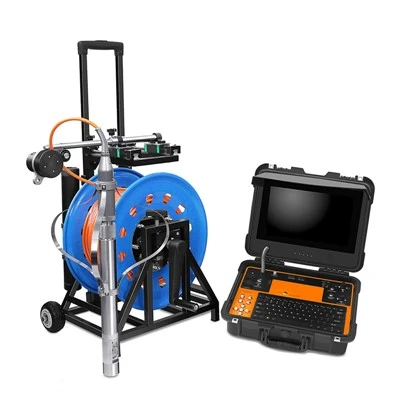
As a supplier of CCTV pipe crawler robots, I've encountered numerous customers facing common issues with these high - tech devices. In this blog, I'll share some practical tips on how to troubleshoot these problems, ensuring your pipe inspection operations run smoothly.
1. Power - related Problems
One of the most frequent issues with CCTV pipe crawler robots is power failure. If your robot suddenly stops working, the first thing to check is the power supply.
Battery Issues
- Low Battery: A low - battery situation is often the culprit. Most modern pipe crawler robots are equipped with battery indicators. If the indicator shows a low - battery warning, recharge the battery immediately. It's advisable to have spare batteries on hand, especially for long - term inspection projects. For example, our Pipe Robot models come with easily replaceable batteries, allowing for quick battery swaps during operations.
- Battery Not Charging: If the battery fails to charge, check the charger and the charging port on the robot. Sometimes, debris or dirt may accumulate in the charging port, preventing proper connection. Use a soft brush to clean the port gently. If the charger is the problem, try using a different charger to see if the battery charges. If not, the battery may be damaged and need replacement.
Power Cable Problems
- Damaged Cables: The power cable connecting the robot to the power source can get damaged during use, especially in harsh pipe environments. Inspect the cable for any visible cuts, frays, or breaks. If you find any damage, replace the cable immediately. A damaged cable can not only cause power loss but also pose a safety hazard.
- Loose Connections: Ensure that all power connections are secure. Check the connection between the cable and the robot, as well as the connection between the cable and the power source. A loose connection can lead to intermittent power supply, causing the robot to malfunction.
2. Movement and Mobility Problems
The ability of the CCTV pipe crawler robot to move smoothly through pipes is crucial for effective inspection.
Wheel or Track Issues
- Wheel/Track Damage: Pipes may contain sharp objects or rough surfaces that can damage the wheels or tracks of the robot. Inspect the wheels or tracks for any signs of wear, tear, or damage. If a wheel is cracked or a track is broken, replace it promptly. Our Pipe Crawler models are designed with durable wheels and tracks, but regular inspection is still necessary.
- Wheel/Track Blockage: Debris such as sand, mud, or small stones can get stuck in the wheels or tracks, preventing the robot from moving freely. Use a small tool like a screwdriver or a pair of tweezers to remove the blockage carefully.
Motor Problems
- Motor Failure: If the robot fails to move or moves sluggishly, the motor may be the problem. Check if the motor is overheating. An overheating motor can indicate a mechanical problem or an electrical issue. If the motor is overheating, stop using the robot immediately and let it cool down. If the problem persists, it may be necessary to replace the motor.
- Motor Control Issues: The motor control system may malfunction, causing the robot to move erratically or not at all. Check the control panel for any error messages. If there are error codes, refer to the user manual for troubleshooting steps. Sometimes, a simple reset of the control system can solve the problem.
3. Camera and Imaging Problems
The camera is the heart of the CCTV pipe crawler robot, providing crucial visual information for pipe inspection.
Camera Blur or Distortion
- Dirty Lens: The camera lens can get dirty due to dust, water, or other contaminants in the pipe. Use a clean, soft cloth to wipe the lens gently. Avoid using abrasive materials that can scratch the lens. If the lens is still dirty after cleaning, it may be necessary to remove the lens and clean it more thoroughly according to the manufacturer's instructions.
- Focus Issues: Check if the camera is properly focused. Some CCTV pipe crawler robots have manual or automatic focus adjustment features. If the image is blurry, try adjusting the focus settings. If the problem persists, there may be an issue with the camera's focusing mechanism, and professional repair may be required.
No Image or Poor Image Quality
- Camera Connection: Ensure that the camera is properly connected to the control unit. A loose or damaged connection can result in no image or poor image quality. Check the cable connecting the camera to the control unit for any damage and make sure it is securely plugged in.
- Camera Malfunction: If all connections are fine and there is still no image or poor image quality, the camera itself may be malfunctioning. Check if the camera is getting power. If it is, the camera may have a hardware problem and need to be replaced or repaired.
4. Communication and Data Transmission Problems
Effective communication between the robot and the control unit is essential for real - time monitoring and data collection.
Signal Interference
- External Interference: Pipes may be located in areas with high electromagnetic interference, such as near power lines or other electrical equipment. This interference can disrupt the communication signal between the robot and the control unit. Try moving the control unit to a different location to see if the signal improves. You can also use signal boosters or shields to reduce interference.
- Internal Interference: Sometimes, internal components of the robot or the control unit can cause signal interference. Check if there are any loose wires or components inside the units. Tighten any loose connections and ensure that all components are properly grounded.
Data Transmission Failure
- Cable Issues: The data cable connecting the robot to the control unit can be a source of problems. Similar to power cables, data cables can get damaged or have loose connections. Inspect the data cable for any damage and ensure all connections are secure.
- Software Problems: The software used for data transmission may encounter glitches. Try restarting the control unit and the robot. If the problem persists, check if there are any software updates available. Installing the latest software version can often solve data transmission issues.
5. Environmental and Operational Problems
The pipe environment can present unique challenges to the operation of the CCTV pipe crawler robot.

Pipe Obstructions
- Blockages: Pipes may be blocked by debris, roots, or other objects. If the robot encounters an obstruction, do not force it to move forward. Instead, try to reverse the robot and assess the situation. You may need to use additional tools to remove the obstruction before continuing the inspection.
- Pipe Shape and Size: The robot may have difficulty moving through pipes with irregular shapes or sizes. Make sure the robot is suitable for the pipe diameter and shape before starting the inspection. Some of our Storm Sewer Camera models are designed to handle a wide range of pipe sizes and shapes, but it's still important to choose the right model for the job.
Harsh Environmental Conditions
- High Temperature or Humidity: Extreme temperatures and high humidity can affect the performance of the robot. In high - temperature environments, the robot may overheat, and in high - humidity environments, moisture can damage the electronic components. If possible, try to limit the operation of the robot in such conditions. If not, take appropriate measures such as using cooling or dehumidifying equipment.
In conclusion, troubleshooting common problems of a CCTV pipe crawler robot requires a systematic approach. By following these tips, you can quickly identify and resolve issues, minimizing downtime and ensuring the success of your pipe inspection projects. If you encounter problems that you are unable to solve, our team of experts is always ready to assist you. Whether you are looking for replacement parts, technical support, or considering purchasing a new CCTV pipe crawler robot, we are here to help. Contact us for more information and to discuss your specific needs.
References
- Manufacturer's user manuals for CCTV pipe crawler robots
- Industry standards and best practices for pipe inspection equipment maintenance