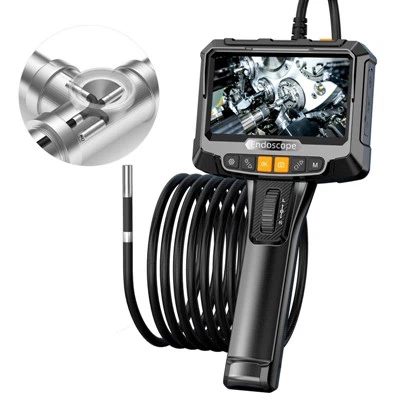
As a supplier of high - quality down hole cameras, I've witnessed the growing demand for integrating these cameras with robotic devices. This integration can significantly enhance the efficiency and accuracy of down hole inspections, whether it's for well drilling, borehole exploration, or underwater applications. In this blog, I'll share some practical steps on how to mount a down hole camera on a robotic device.
Understanding the Compatibility
Before you start the mounting process, it's crucial to ensure that your down hole camera is compatible with the robotic device. Different robotic devices have various specifications in terms of size, weight capacity, power supply, and communication interfaces.
First, consider the physical dimensions of the camera. For instance, our 45mm Dual View Deep Water Well Camera Drilling Inspection Camera has a specific diameter and length. You need to make sure that the robotic device has enough space to accommodate the camera without causing any interference with its other components.
The weight of the camera is also an important factor. The robotic device should be able to support the weight of the camera without sacrificing its mobility or stability. If the camera is too heavy, it may cause the robotic device to malfunction or even break down during operation.
Power supply is another critical aspect. Down hole cameras usually require a stable power source to function properly. Check the power requirements of your camera and ensure that the robotic device can provide the necessary voltage and current. Some cameras may need a direct power connection, while others can be powered through a battery pack. You may need to modify the power system of the robotic device to meet the camera's needs.


Communication interfaces are essential for transmitting the video and data captured by the camera. The robotic device should have compatible interfaces, such as Ethernet, USB, or Wi - Fi, to establish a reliable connection with the camera. Make sure that the communication protocol used by the camera is supported by the robotic device's software.
Selecting the Mounting Location
Once you've confirmed the compatibility, the next step is to choose the right mounting location on the robotic device. The mounting location should provide a clear view of the area to be inspected while ensuring the safety and stability of the camera.
For borehole inspections, if you're using a Bore Hole Camera, it's often beneficial to mount the camera at the front or bottom of the robotic device. This position allows the camera to capture a direct view of the borehole walls, which is crucial for detecting cracks, fractures, or other defects.
In underwater applications, when using an Underwater Borehole Camera, the mounting location should be carefully selected to avoid obstacles and ensure that the camera lens is not blocked by debris. Mounting the camera on a swivel or a movable arm can provide more flexibility in adjusting the viewing angle.
You also need to consider the protection of the camera. The mounting location should shield the camera from potential impacts, vibrations, and harsh environmental conditions. For example, if the robotic device is operating in a high - pressure environment, the camera should be mounted in a way that it can withstand the pressure.
Preparing the Mounting Hardware
After selecting the mounting location, you need to prepare the appropriate mounting hardware. The type of hardware you choose depends on the design of the camera and the robotic device.
Common mounting hardware includes brackets, clamps, and screws. Brackets can be used to attach the camera to the robotic device. Make sure that the brackets are made of a strong and durable material, such as stainless steel or aluminum, to withstand the forces during operation.
Clamps are useful for securing the camera in place, especially if the camera has a cylindrical shape. They can provide a tight and stable grip without damaging the camera.
Screws are used to fasten the brackets or clamps to the robotic device. Choose screws that are the right size and length for the application. Over - tightening the screws can damage the camera or the robotic device, while under - tightening may cause the camera to loosen during operation.
Before installing the mounting hardware, clean the mounting surfaces of the camera and the robotic device to ensure a good fit. Remove any dirt, grease, or debris that may affect the adhesion or stability of the hardware.
Installing the Camera
Now it's time to install the camera on the robotic device. Follow these steps to ensure a proper installation:
- Position the Camera: Place the camera at the selected mounting location on the robotic device. Make sure that the camera is aligned correctly and that the viewing angle is as desired.
- Attach the Mounting Hardware: Use the prepared brackets, clamps, or screws to attach the camera to the robotic device. Tighten the hardware gradually to avoid over - tightening.
- Connect the Power and Communication Cables: Connect the power cable of the camera to the power source on the robotic device. Then, connect the communication cable to the appropriate interface on the robotic device. Make sure that the connections are secure and that there are no loose wires.
- Test the Camera: Before sending the robotic device into the down hole, test the camera to ensure that it is working properly. Check the video feed and make any necessary adjustments to the camera settings, such as focus, brightness, and contrast.
Conducting a Final Check
After installing the camera, conduct a final check to ensure the safety and functionality of the entire system.
Inspect the mounting hardware to make sure that it is firmly attached and that there are no signs of loosening or damage. Check the power and communication cables to ensure that they are not pinched or damaged.
Test the mobility of the robotic device with the camera attached. Make sure that the camera does not interfere with the movement of the robotic device and that the robotic device can still operate smoothly.
Verify the video quality and the stability of the communication link. If there are any issues, troubleshoot them immediately before starting the actual inspection.
Conclusion
Mounting a down hole camera on a robotic device requires careful planning and attention to detail. By ensuring compatibility, selecting the right mounting location, preparing the appropriate hardware, and following the correct installation steps, you can successfully integrate a down hole camera with a robotic device.
If you're interested in our high - quality down hole cameras or have any questions about mounting them on robotic devices, we'd love to hear from you. Contact us to start a procurement discussion and find the best solutions for your down hole inspection needs.
References
- Industry standards for down hole camera technology
- Manufacturer's manuals for down hole cameras and robotic devices
- Technical papers on the integration of cameras with robotic systems